Summary / Key Takeaway
A native IP address is a network IP address whose Regional Internet Registry (RIR) allocation, Border Gateway Protocol (BGP) routing origin, and physical geolocation database records perfectly align within the same target country or region. Unlike broadcast or non-native IPs—which route traffic through external servers and trigger strict anti-bot flags—native IPs present a genuine, localized footprint. For digital marketers, e-commerce sellers, and data scrapers, utilizing native IPs ensures maximum trust, minimal CAPTCHAs, and uninterrupted account operations across high-security platforms like Amazon, Google, Meta, and TikTok.
Introduction
In modern web scraping, multi-account management, cross-border e-commerce, and automated digital marketing, network trust is everything. If your proxy or host server uses an IP address whose underlying data appears suspicious to anti-bot engines, your requests face immediate CAPTCHAs, rate-limiting, or permanent account bans.
This brings us to one of the most vital concepts in network infrastructure: the native IP address.
Understanding what a native IP address is, how it differs from broadcast IPs, and why anti-fraud systems favor it can mean the difference between seamless scraping operations and complete operational disruption. In this comprehensive guide, we unpack the technical mechanics, real-world applications, and verification methods for native IPs, leveraging verified field experience and proxy infrastructure data from OKKProxy.
What Is a Native IP Address?
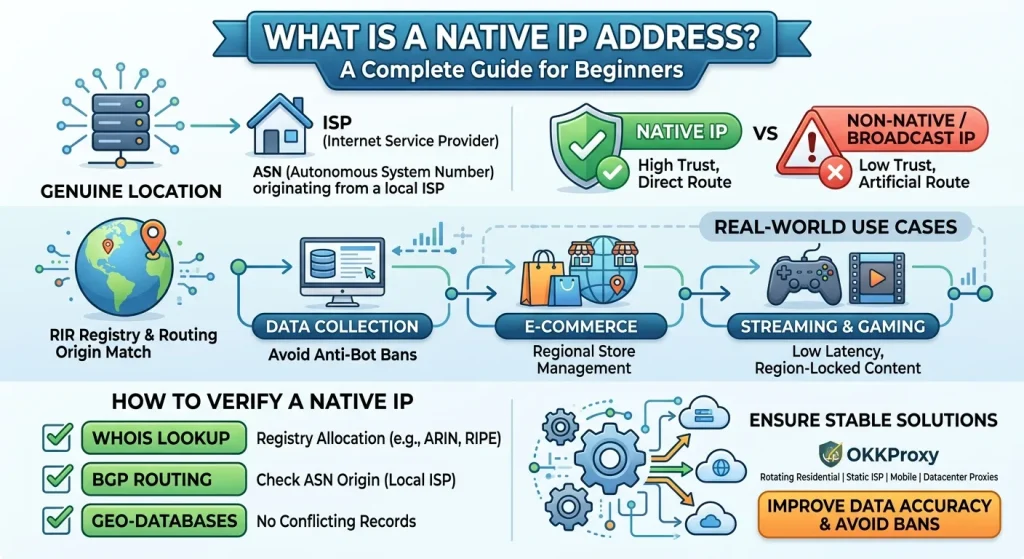
To answer what is a native IP address, we must distinguish between standard IP routing and localized internet allocation.
In computer networking, “native IP” (or native IP address) is an industry term used across proxy services, web scraping, and virtual private server (VPS) hosting. It describes an IP address where its official registry location, BGP routing path, and commercial geolocation data all match the specific country or region claimed by the provider.
When an IP address is “native,” it connects directly through a local Internet Service Provider (ISP) network node without passing through multi-layered intermediate forwarding, cross-border tunneling, or proxy masking.
Key Characteristics of a Native IP Address
- Consistent Provenance: The Regional Internet Registry (RIR)—such as ARIN (North America), RIPE NCC (Europe), or APNIC (Asia-Pacific)—lists the exact same physical country as the commercial GeoIP databases (MaxMind, IP2Location).
- Local Autonomous System Number (ASN): The Border Gateway Protocol (BGP) routing data confirms that the IP block is announced directly by a native residential or commercial telecom operator (e.g., AT&T, Comcast, Verizon, BT) based in that jurisdiction.
- No Cross-Border Routing Delay: Because traffic does not hop across international tunnels to appear local, connection latency remains low and TCP/IP stack fingerprints match local operating standards.
Native IP vs. Broadcast IP: What Is the Difference?
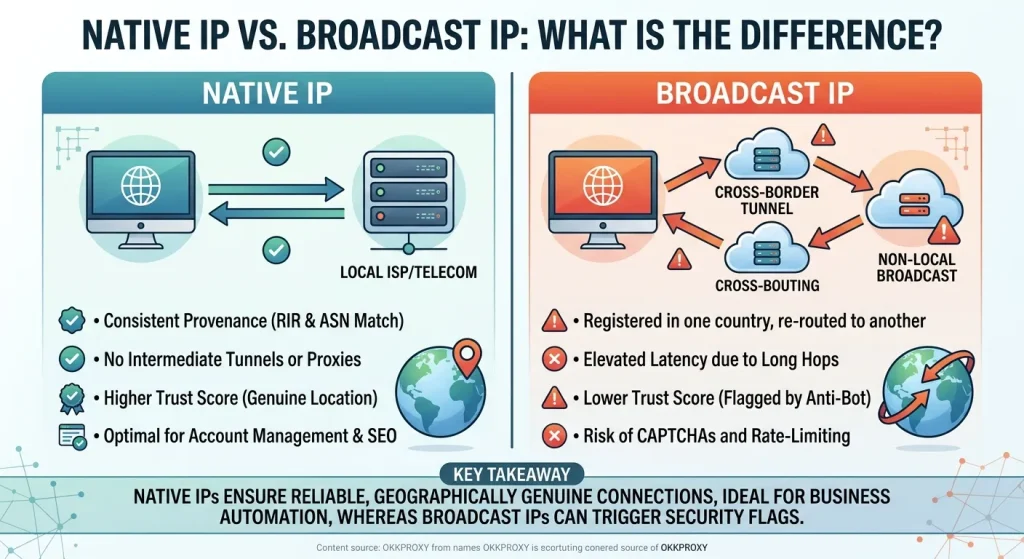
To understand why platforms flag proxy networks, you must compare a native IP address with a broadcast (non-native) IP address.
A broadcast IP occurs when a provider purchases an IP block registered in one region (for example, Germany under RIPE) but artificially routes or broadcasts it via BGP to host servers in a completely different country (for example, the United States under ARIN).
While basic GeoIP lookups may show the location as “United States,” deep network inspections immediately spot the contradiction between the RIR record and the server’s routing hop.
Comparison Matrix: Native IP vs. Broadcast IP
| Parameter | Native IP Address | Broadcast (Non-Native) IP Address |
| RIR Registration | Matches the actual physical location | Belongs to a different region or country |
| BGP ASN Origin | Local Telecom / ISP | Foreign Data Center or Transit Carrier |
| IP Trust Score | Extremely High (95% – 100%) | Low to Medium (Flagged by Cloudflare/Akamai) |
| Ping & Latency | Ultra-low local network latency | Elevated due to cross-border tunneling |
| Cost | Premium due to strict local Sourcing | Budget / Low-cost bulk allocations |
| Best Use Case | Account management, social media, stealth scraping | Basic web browsing, unblocking non-sensitive sites |
Why Native IPs Matter for Digital Marketers & Data Teams
Modern websites no longer rely on simple IP location checks. Enterprise security layers like Cloudflare, Kasada, PerimeterX, and Akamai evaluate the complete network fingerprint. When an IP address shows mismatches between its ASN, RIR, and OS TCP/IP stack, anti-bot engines automatically trigger CAPTCHAs or immediate block responses.
By leveraging native residential IP and static ISP proxies, businesses achieve several advantages:
1. Higher Success Rates in Web Scraping & SERP Monitoring
When performing automated price monitoring or SEO rank tracking, non-native IPs are frequently detected as automated datacenter traffic. Utilizing OKKProxy Rotating Residential Proxies gives you access to genuine native residential connections, allowing search engine scrapers to harvest localized search engine result pages (SERPs) without triggering IP bans.
2. Account Protection in Multi-Account E-Commerce & Social Media
Platforms like Amazon, eBay, Etsy, TikTok, and Meta maintain fraud prevention systems that analyze account logins. If an account registered in the United States logs in via an IP address whose WHOIS record points to a European data center, the platform flags the account for suspicious activity. Using OKKProxy Static ISP Proxies ensures your storefront or ad manager account stays tied to a permanent, pristine native ISP connection.
3. Precise Geo-Targeted Advertising & Market Research
Ad networks check whether traffic originates from the exact geographic target before serving localized ads. Non-native IPs often fail ad verification audits, resulting in inaccurate market intelligence.
OKKProxy Infrastructure: Sourcing Genuine Native IPs
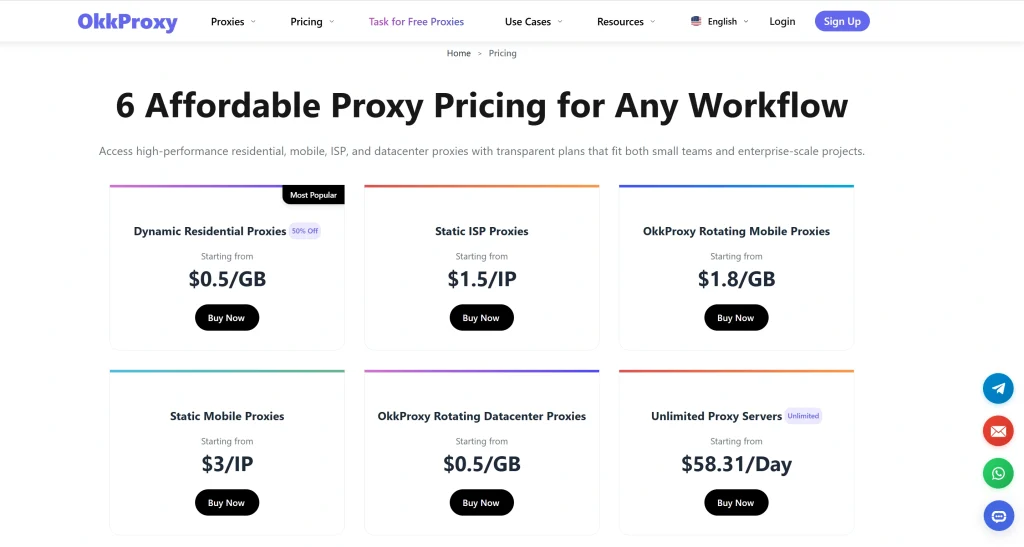
Not all proxy providers offer true native IPs. Many low-cost vendors market cheap datacenter subnets or re-routed cloud blocks as “residential” traffic.
At OKKProxy, proxy infrastructure is built on clean, ethically sourced IP pools spanning 190+ countries and regions. OKKProxy offers specialized proxy types to meet specific operational workloads:
1. Static ISP Proxies (100% Native ISP Connections)
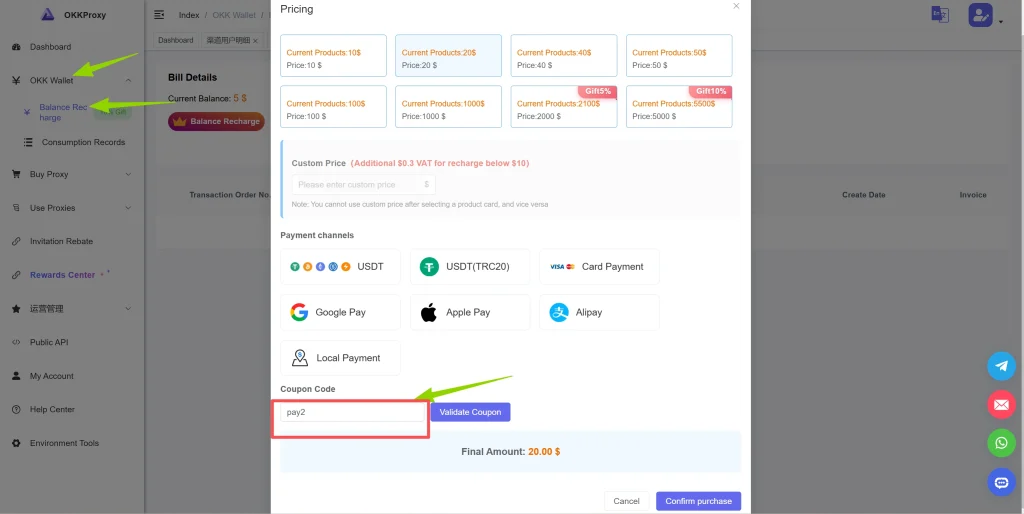
- Pricing: Broadcast IP from $1.50/IP (7 Days) / Premium Native IP from $4.50/IP (7 Days). (Use code PAY2 for 10% OFF)
- Features: Blends the ultra-high trust score of a residential IP with the speed and stability of a dedicated server connection. Supports HTTP(S) and SOCKS5 protocols.
- Best For: Social media account management, Amazon seller central, Google Ads management, long-term browser automation.
2. Rotating Residential Proxies
- Pricing: Standard plans starting from $1.50/GB down to $0.50/GB for high-volume users; Advanced plans down to $0.50/GB.
- Features: Automatic IP rotation or custom sticky sessions with country, state, and city-level targeting across 190+ countries.
- Best For: Web scraping, LLM data pipeline feeding, SERP monitoring, ad verification.
3. Mobile Proxies (Rotating & Static)
- Pricing: Rotating Mobile starting at $3.20/GB (scaling down to $1.80/GB); Static Mobile from $3/IP per day.
- Features: Utilizes real 4G/5G mobile carrier networks (AT&T, Verizon, T-Mobile, Vodafone).
- Best For: App testing, TikTok growth automation, bypassing aggressive mobile-first anti-bot filters.
4. Unlimited Residential Proxies
- Unlimited Residential: Dedicated bare-metal servers with 1,000 QPS concurrency and 200 Mbps bandwidth, starting at $58.30/day.
- Best For: Enterprise high-concurrency web scraping and mass data harvesting.
How to Verify If Your IP Address Is Native (3-Step Audit)
Before using an IP address for high-stakes business operations, run this 3-step verification process to determine whether it is a genuine native IP address.
Step 1: Check the Regional Internet Registry (RIR)
Run a WHOIS query on the target IP address using the official RIR search tool corresponding to the IP block:
- ARIN (North America)
- RIPE NCC (Europe, Middle East)
- APNIC (Asia-Pacific)
- LACNIC (Latin America)
- AFRINIC (Africa)
What to look for: Look at the Country field in the WHOIS output. If you purchased a “US Native IP,” but the RIR registration shows Country: DE (Germany) or Country: CN (China), the IP is non-native/broadcast.
Step 2: Inspect the BGP Routing Origin & Autonomous System (ASN)
Use a public BGP lookup tool to query the IP’s Autonomous System Number.
Bash
# Terminal WHOIS Inspection Command
whois -h whois.radb.net 104.28.18.30 | grep origin
- Native Result: The ASN belongs directly to a local residential service provider (e.g., AS7018 AT&T Services or AS7922 Comcast Cable).
- Non-Native Result: The ASN points to a hosting or transit network (e.g., AS14061 DigitalOcean or AS16276 OVH) while GeoIP databases list it as a residential home address.
Step 3: Cross-Reference Commercial Geolocation Databases
Test the IP across major commercial GeoIP engines:
- MaxMind GeoIP2
- IP2Location
- DB-IP
If two databases list the country as “United States” but a third lists “Netherlands,” the IP block is mid-propagation or broadcast, making it risky for multi-account management.
Real-World Enterprise Case Study: Overcoming Anti-Bot Bans
The Client’s Challenge
A fast-growing cross-border e-commerce brand operating 40+ Amazon seller accounts in North America experienced sudden account suspensions and constant OTP/CAPTCHA challenges.
Despite purchasing “US Residential Proxies” from a budget vendor, their account login success rate plummeted to 42%.
The Root Cause Analysis
OKKProxy’s technical team conducted a diagnostic audit on the client’s proxy pool. The results revealed:
- 82% of the proxy IPs were broadcast IPs: registered in Eastern Europe under RIPE, but artificially routed to US datacenter nodes.
- Commercial anti-fraud databases flagged these IPs as high-risk, triggering security checks upon login.
The Solution & Implementation
The client migrated their infrastructure to OKKProxy Static ISP Proxies paired with an anti-detect browser environment:
- Dedicated Native IPs: Each seller account was assigned a static, native US IP address with genuine AT&T and Comcast ASN routing.
- Sticky Protocol Routing: Requests utilized HTTP/SOCKS5 protocols over native network adapters, maintaining stable session cookies.
The Results
- 0 Account Bans recorded over the following 6 months.
- 99.4% Login Success Rate across all 40+ storefront accounts.
- 4x Speed Improvement, reducing page load latency from 340ms to 85ms.
Developer Guide: Native IP Integration Code Examples
Integrating native proxies into modern development stacks is straightforward. Below are practical code snippets showing how to implement native IP proxies in Node.js (Fetch) and React Native.
1. Node.js Native Fetch Proxy Integration
When making server-side requests in Node.js using native fetch or undici, configure your OKKProxy credentials as follows:
JavaScript
// Node.js 18+ Native Fetch with Proxy Agent Example
import { Dispatcher, ProxyAgent } from ‘undici’;
// Define OKKProxy Static ISP or Rotating Residential Credentials
const proxyUrl = ‘http://username:[email protected]:8000’;
const proxyAgent = new ProxyAgent(proxyUrl);
async function fetchWithNativeProxy() {
try {
const response = await fetch(‘https://api.ipify.org?format=json’, {
dispatcher: proxyAgent,
headers: {
‘User-Agent’: ‘Mozilla/5.0 (Windows NT 10.0; Win64; x64) AppleWebKit/537.36’
}
});
const data = await response.json();
console.log(‘Connected Native IP Address:’, data.ip);
} catch (error) {
console.error(‘Error connecting through native proxy:’, error);
}
}
fetchWithNativeProxy();
2. React Native: Retrieving Public Device IP Address
In mobile app development, you often need to verify whether a mobile client is connecting through its native network interface or an active proxy connection.
JavaScript
// React Native: Fetching Client IP Address Example
import React, { useEffect, useState } from ‘react’;
import { Text, View, StyleSheet } from ‘react-native’;
export default function NativeIPChecker() {
const [ipAddress, setIpAddress] = useState(‘Loading…’);
useEffect(() => {
// Fetch public IP address directly via React Native fetch
const getPublicIP = async () => {
try {
const response = await fetch(‘https://api.ipify.org?format=json’);
const data = await response.json();
setIpAddress(data.ip);
} catch (error) {
setIpAddress(‘Failed to retrieve IP’);
}
};
getPublicIP();
}, []);
return (
<View style={styles.container}>
<Text style={styles.title}>Client Active Public IP:</Text>
<Text style={styles.ipText}>{ipAddress}</Text>
</View>
);
}
const styles = StyleSheet.create({
container: { flex: 1, justifyContent: ‘center’, alignItems: ‘center’ },
title: { fontSize: 18, fontWeight: ‘bold’ },
ipText: { fontSize: 22, color: ‘#0066cc’, marginTop: 10 },
});
Native IP Pre-Flight Checklist for Marketers & Scrapers
Before launching your next scraping project, social media campaign, or multi-account matrix, go through this pre-flight checklist:
- RIR Verification Completed: Confirmed that WHOIS records match the desired target location.
- ASN Cleanliness Checked: Verified that the IP originates from a recognized residential telecom carrier (e.g., Comcast, AT&T, Deutsche Telekom) rather than a public cloud host.
- Protocol Selected: Configured HTTP/HTTPS or SOCKS5 based on software requirements.
- Sticky Session Rules Set: Set dynamic rotating proxies for web scraping or static ISP proxies for permanent account logins.
- Discount Code Applied: Applied promo code PAY2 at OKKProxy checkout to save 10% on all recharges.
Frequently Asked Questions (FAQ)
What is a native IP address?
A native IP address is an IP address whose official registry record (RIR), network routing origin (ASN), and commercial geolocation databases all point to the exact same country or region without intermediate cross-border tunneling.
What is the difference between a residential native IP and a vpn context IP?
In a VPN context, a “native residential IP” means the VPN routes your connection through a genuine home internet connection located natively in that country, rather than passing through a commercial data center VPN node that can easily be identified and blocked.
Is 192.168.1.1 a real native IP address?
No. 192.168.1.1 is a private (non-routable) IP address reserved for local area networks (LANs) inside homes and offices. It cannot be routed on the public internet and is not a public native IP address.
Does a native VLAN or native trunk link need an IP address?
In network engineering (such as Cisco CCNA routing), a native VLAN itself does not strictly require an IP address unless you intend to manage the switch layer remotely via a Switched Virtual Interface (SVI).
Why do DNS servers still resolve native IP addresses faster?
Native IPs hosted on local ISP infrastructure usually route through localized DNS resolvers, resulting in faster round-trip times (RTT) and fewer hops compared to broadcast IPs routed across international transit networks.
Key Takeaways & Final Thoughts
Using genuine native IP addresses is the single most effective way to avoid IP blocks, pass anti-bot checks, and protect online assets. While broadcast or datacenter IPs may seem appealing for budget tasks, they often lead to higher operational costs from failed requests, constant CAPTCHAs, and account suspensions.
Whether you need Static ISP Proxies for long-term account management or Rotating Residential Proxies for large-scale data harvesting, OKKProxy provides high-performance, ethically sourced native proxy solutions across 190+ countries.
Ready to upgrade your proxy infrastructure?
Visit OKKProxy.com today and use promo code PAY2 to claim 10% OFF on all recharges!