
Summary
To achieve a seamless experience on Janitor AI in 2026, understanding the technical interplay between API keys and IP reputation is vital. Most users struggle with the dreaded proxy error 429 janitor ai, which is almost always a result of IP flagging.
This guide leverages OKKProxy’s enterprise-grade data to show you how to implement Janitor AI proxy solutions—specifically using static ISP proxies and rotating residential proxies—to ensure 99.9% uptime, lightning-fast response times, and total privacy for your AI interactions.
The Complete 2026 Janitor AI Proxy Handbook: Stable IPs, Speed Tips & What to Avoid
The rise of personalized LLMs has made Janitor AI a powerhouse for creative roleplay. However, as the platform grows, so does the complexity of maintaining a stable connection. If you’ve ever asked, “What’s a proxy on Janitor AI?” or wondered “Why is Janitor AI so popular?”, you aren’t alone. Its popularity stems from its “no-filter” approach, but that freedom requires a robust Janitor AI proxy setup to bypass the platform’s heavy traffic and rate limits.
What is a Proxy on Janitor AI and Why Do You Need One?
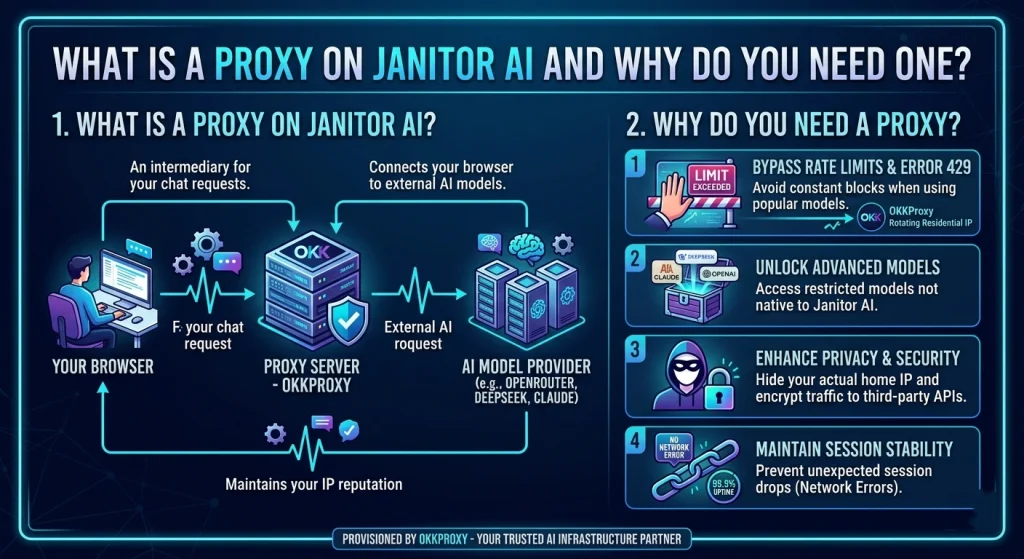
In the context of AI roleplay, a Janitor AI proxy acts as an intermediary. Instead of your computer talking directly to an LLM provider (like OpenAI or Claude), the request goes through a proxy server.
Why use a proxy for Janitor AI?
- Access Restricted Models: Use DeepSeek or Claude 3.5 even if they aren’t natively supported in your region.
- Privacy: Hide your home IP address from third-party API providers.
- Stability: Avoid the Janitor AI network error caused by local ISP throttling.
- Cost Efficiency: Use a Janitor AI reverse proxy to manage API costs across different models.
How to Use Janitor AI Proxy: A 2026 Step-by-Step Guide
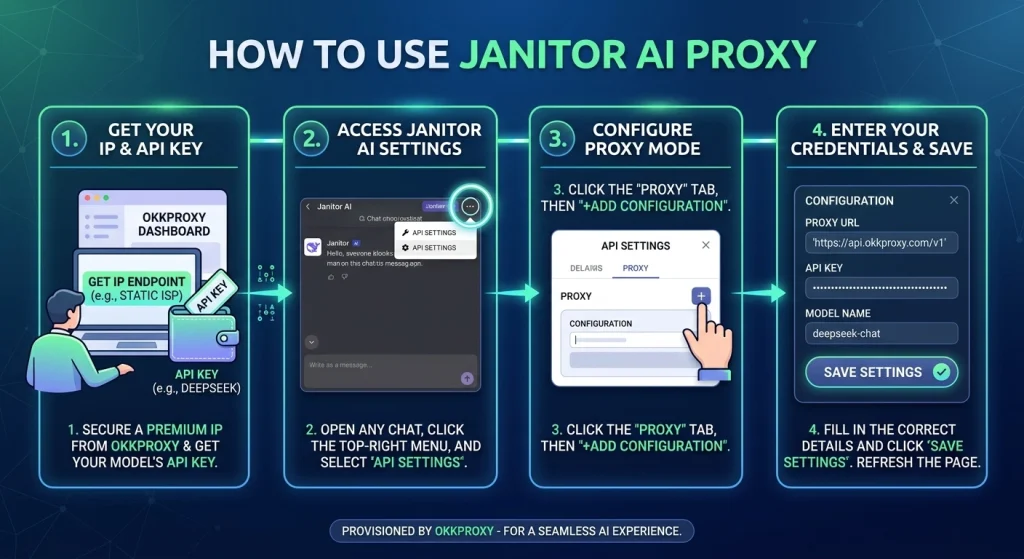
Setting up a proxy shouldn’t be a headache. Based on our successful deployments at OKKProxy, here is the most reliable way to how to set up proxy janitor ai.
Step 1: Understand When a Proxy Is Needed
Not every Janitor AI user needs a proxy. A proxy can be useful in scenarios such as:
- Geo-restricted access: Some models or endpoints may not be reachable in certain regions.
- Rate limit management: Rotating proxies help avoid temporary blocks from repeated requests.
- Session stability: Persistent static IPs can maintain uninterrupted sessions when using long-running scripts or automated workflows.
Step 2: Choose the Right Proxy Type
When a proxy is required, choosing the correct type is essential:
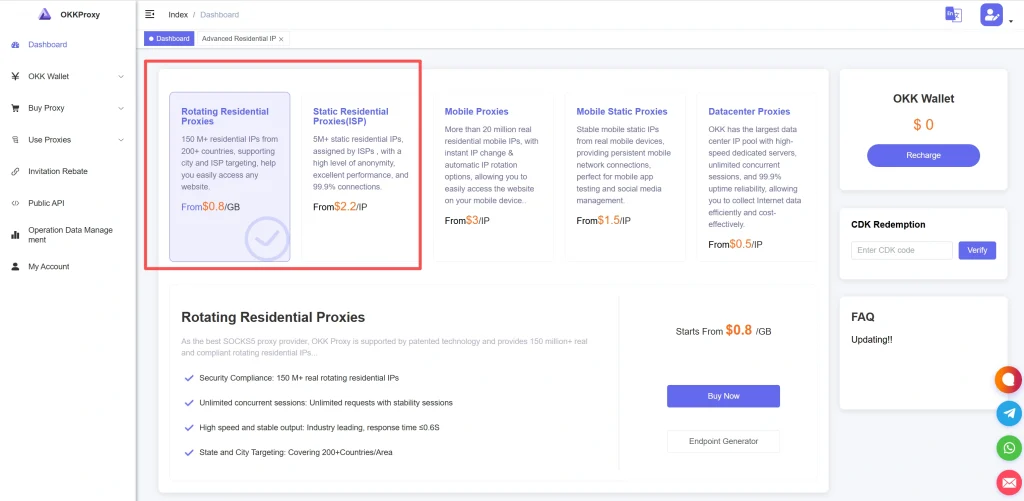
Rotating Residential Proxies: Ideal for avoiding rate limits, especially if you make frequent API requests or run multiple sessions simultaneously.
Static ISP Proxies: Best for long-running workflows or sessions where a consistent IP address is needed. These proxies offer higher stability for extended interactions.
Avoid using free proxies—they are often slow, unstable, and can cause your API requests to fail.
Step 3: Configure Janitor AI API Settings
Regardless of whether you use a proxy, the API configuration is the core step:
1. Open any chat in Janitor AI.
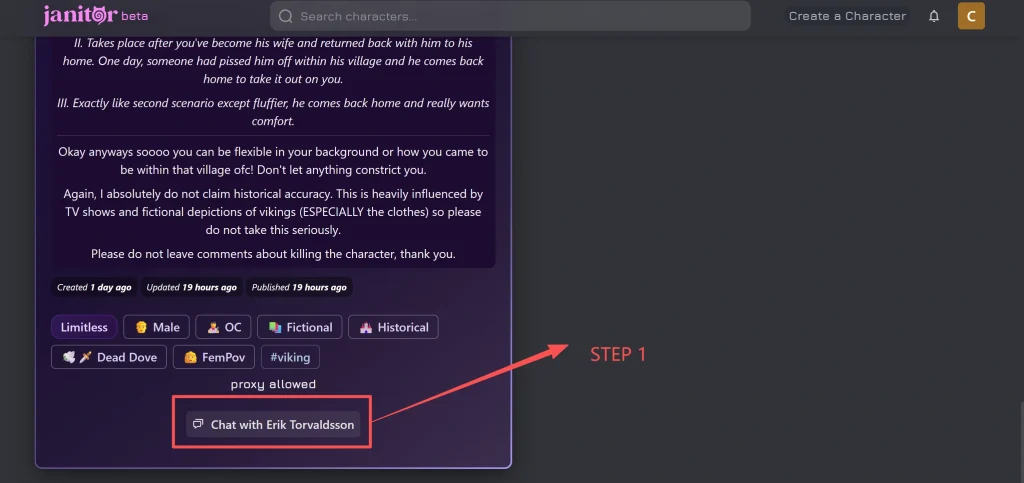
2. Navigate to the API Settings menu.
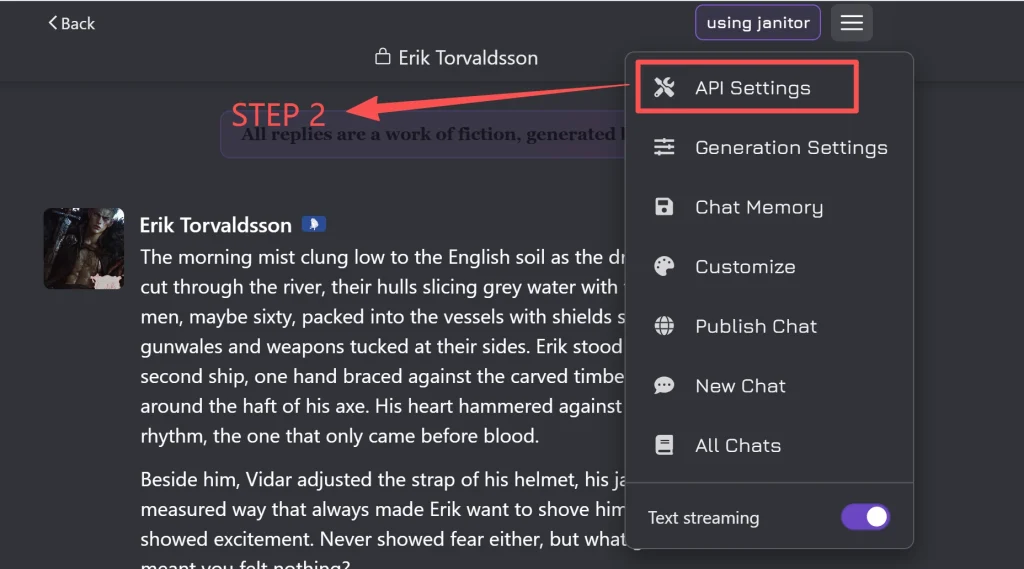
3. Select your preferred API provider (e.g., OpenRouter, DeepSeek).
4. Enter the API key and choose the model ID you want to use.
5. If using a proxy, enable the proxy option and input the proxy address (IP:Port) along with any authentication credentials.
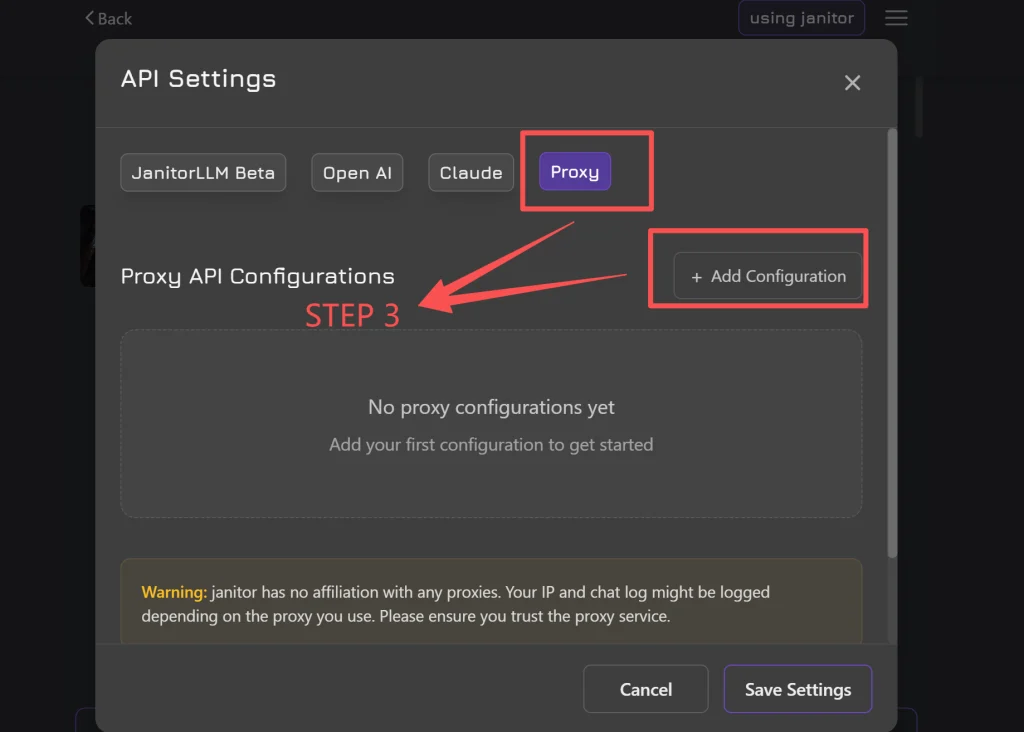
Remember: The API endpoint (e.g., https://api.deepseek.com/v1) is separate from the proxy. A proxy only routes your requests—it does not replace the API credentials.
Step 4: Troubleshoot Common Errors
Understanding common errors can save a lot of time:
| Error | Possible Cause | Solution |
| 401 Unauthorized | API key invalid, expired, or lacking permissions | Double-check your API key or generate a new one |
| 404 Not Found | Incorrect API endpoint or model ID | Verify the URL and model name in your settings |
| 429 Too Many Requests | Rate limit exceeded | Use a rotating proxy or reduce request frequency |
| 500 Internal Server Error | Server-side issue | Retry after a few minutes or contact your API provider |
Step 5: Best Practices for Proxy and API Use
- Always choose proxies from trusted providers to reduce downtime and ensure speed.
- Rotate your IPs when making multiple requests to avoid temporary blocks.
- Keep your API keys secure and never share them publicly.
- Monitor session stability and adjust proxy type based on your workflow.
Solving the Infamous Proxy Error 429 Janitor AI
The most frequent pain point for users is the janitor ai 429 error, which means “Too Many Requests.” This isn’t just about how fast you type; it’s about how many people are sharing your IP address.
Why “Free Proxies” Fail
Many users search for a free proxy for Janitor AI or a best free proxy for janitor ai. While tempting, these public IPs are often blacklisted within minutes. When hundreds of users hit the same API through one free reverse proxy janitor ai, the system triggers a janitor ai proxy error 429.
The OKKProxy Solution: Rotating Residential Proxies
By using rotating residential proxies, each request you send appears to come from a different, genuine home user. This makes it virtually impossible for the AI provider to rate-limit you.
Customer Case Study: A digital creator using Janitor AI reported constant proxy error 429 janitor ai issues when using standard VPNs. After switching to OKKProxy’s rotating residential proxies, their “Rate Limit” errors dropped to zero, allowing for 24/7 character testing.
Comparing Proxy Types for Janitor AI Performance
| Proxy Type | Best For | Stability | Speed |
| Static ISP Proxies | Long-form storytelling | Highest | Very Fast |
| Rotating Residential | Bypassing Error 429 | High | Fast |
| Rotating Mobile Proxies | Extreme Anonymity | Medium | Moderate |
| Datacenter Proxies | High-speed, low-cost | Low | Fastest |
What is a Reverse Proxy Janitor AI?
A reverse proxy (often found on janitor ai reverse proxy github repositories) is a server that handles the “handshake” between you and the AI. While a reverse proxy for janitor ai free sounds great, they often suffer from the “signed into random persons account on janitor ai” bug due to poor session management. For professional-grade security, always use a private Janitor AI proxy key.
Top 7 Expert Tips for a Better Janitor AI Proxy Experience
- Use Static ISP Proxies for Continuity: If your IP changes mid-chat, some models might trigger a security refresh. Static ISP proxies provide the reliability of a home connection that never changes.
- Optimize Your Temperature: For Janitor AI proxy models like DeepSeek, set your temperature to 0.8. This balances creativity with logic.
- Check Your Janitor AI Proxy URL: Ensure you are using the v1/chat/completions suffix if using OpenRouter or similar services.
- Avoid Shared “Key Pools”: Using a shared janitor ai reverse proxy key from Discord or Reddit is a fast track to getting your account flagged.
- Monitor Your Janitor AI Rate Limit: Even with a good proxy, don’t spam the “Regenerate” button. Give the LLM 2-3 seconds between requests.
- Use Mobile Proxies for Travel: If you are roleplaying on the go, rotating mobile proxies ensure you don’t get blocked by geographic “travel” flags.
- Verify via Reddit: Check the janitor ai proxy reddit community for the latest model “jailbreaks” and prompt optimizations, but buy your IPs from a reputable provider like OKKProxy.
Deep Dive: Janitor AI DeepSeek Proxy Setup
The DeepSeek proxy janitor ai setup has become the gold standard in 2026 due to the model’s high intelligence and low cost.
How to Use DeepSeek Proxy on Janitor AI
To use this specific model, you need to ensure your Janitor AI proxy api is set to the DeepSeek endpoint. In the configuration, use the model string deepseek-ai/deepseek-v3.
Pro-Tip: If you experience a deepseek proxy error janitor ai, it is often due to the provider’s server load. Switching your IP to a different region (e.g., from US to Singapore) via OKKProxy’s dashboard can often resolve the “Server Busy” state.
Safety and Legality: Are Proxy Sites Illegal?
A common concern among new users is: Are proxy sites illegal? or Are proxy servers illegal?
The answer is no. Using a Janitor AI proxy is a legal way to manage your network traffic and protect your digital footprint. However, you should always respect the content guidelines of the LLM provider you are connecting to.
Can Janitor AI see chats?
When you use a proxy, the “middleman” server could technically see the logs. This is why using a free reverse proxy for janitor ai is risky. By using a private Janitor AI proxy through OKKProxy, you ensure your data is encrypted and not stored by third-party hobbyist servers.
Common Janitor AI Proxy Errors & How to Fix Them
1. Janitor AI Proxy Error 502 (Bad Gateway)
This usually means the Janitor AI proxy url you are using is currently down.
- Fix: Check the status of your API provider (like OpenRouter). If they are up, try refreshing your rotating residential proxies to get a fresh connection path.
2. Janitor AI Proxy Error 408 (Request Timeout)
This happens when the AI takes too long to respond.
- Fix: Use Static ISP proxies for a more direct route to the server, reducing latency.
3. Janitor AI Proxy Network Error
This is often a local issue.
- Checklist:
- Is your VPN conflicting with your Janitor AI proxy?
- Is your Janitor AI proxy api key still valid?
- Have you exceeded your data limit on your proxy plan?
Why OKKProxy is the Best Proxy for Janitor AI in 2026
At OKKProxy, we understand that AI users aren’t just looking for “an IP”—they are looking for a seamless narrative experience.
- Global Coverage: Access IPs in over 195 countries to test how different regions affect AI response types.
- Elite Anonymity: Our rotating mobile proxies use real 4G/5G carriers, making your traffic indistinguishable from a standard smartphone user.
- Scalability: Whether you are an individual roleplayer or a developer building a janitor ai reverse proxy github project, our infrastructure scales with you.
- 24/7 Support: We know the frustration of a janitor ai proxy down situation. Our team is always online to help you reconfigure your settings.
Summary Checklist for a Flawless Setup
- Register at OKKProxy and select Rotating Residential Proxies.
- Obtain your API key from your preferred LLM provider.
- Set the Janitor AI proxy url in your settings.
- Test the connection with a “No Proxy Char” first to ensure the site is functional.
- Optimize your “Generation Settings” for the specific Janitor AI proxy models you are using.
Frequently Asked Questions (FAQ)
What does proxy allowed mean in janitor ai?
It means the character creator has enabled the use of external APIs. If a character says “No Proxy,” you must use Janitor’s internal LLM.
How to enable proxy Janitor AI?
Go to API Settings -> Select Proxy -> Add your URL and Key -> Save. It’s that simple.
Is there a free janitor ai proxy no limit?
Realistically, no. Any free janitor ai proxy that claims “no limit” is likely collecting user data or will eventually suffer from proxy error 429 janitor ai. Quality AI compute costs money; a cheap, high-quality proxy is a better investment than a “free” one that breaks your immersion.
What is the best Janitor AI proxy for stability and speed?
For long-term sessions without a janitor ai proxy network error, Static ISP Proxies are the best choice. They provide the high “trust score” of a residential user with the lightning speed of a datacenter, ensuring your Janitor AI proxy URL stays active for hours of uninterrupted play.
Why am I signed into a random person’s account?
This is a session-caching error. If you are using a shared reverse proxy janitor ai, stop immediately. Switch to a private Janitor AI proxy to protect your account.
Final Takeaway
The world of Janitor AI proxy usage is constantly evolving. In 2026, the difference between a frustrating “Network Error” and a perfect roleplay session lies in your choice of IP. Don’t let proxy error 429 janitor ai ruin your experience. By utilizing rotating residential proxies and static ISP proxies from a trusted provider like OKKProxy, you ensure that your creative journey is limited only by your imagination, not by technical barriers.
Ready to start? Choose the right proxy for AI and get 99.9% stable access today.
Internal Links to OKKProxy Resources:
- How to Get Claude AI Pro for Free as a Student (2026 Guide)
- How to Pass Google Gemini Student Verification Easily with OkkProxy
- Why Your Current Proxy Setup Is Failing (And How to Fix It)
- 3 Methods to Set Up Static Residential IPs in Clash
- OkkProxy Ultimate Guide to Static ISP Proxies: Everything You Need to Know
External Authority Sources:
- IETF RFC 7231 (HTTP Error Definitions) – For technical details on Error 429.
- OpenRouter Documentation – For official API endpoint configurations.