Residential proxies are widely used for web scraping, account management, ad verification, and accessing region-locked content. However, despite their popularity, many users fail to achieve stable results because they repeat the same residential proxies mistakes over and over again.
The truth is simple: residential proxies are powerful, but they are not foolproof. When used incorrectly, they can lead to IP bans, poor performance, security risks, and unnecessary costs. Based on real-world experience working with proxy users at OKKProxy, most failures come from misunderstanding how residential proxies work and how they should be configured.
This article explains the top 7 residential proxies mistakes, why they happen, and—most importantly—how to avoid them. If you want residential proxies to actually work the way they are supposed to, this guide will save you time, money, and frustration.
What Is a Residential Proxy?
Before diving into the mistakes, it helps to answer a common question: what is a residential proxy?
A residential proxy is an IP address assigned by an Internet Service Provider (ISP) to a real household device. When you route traffic through it, websites see you as a normal user rather than a server.
How Do Residential Proxies Work?
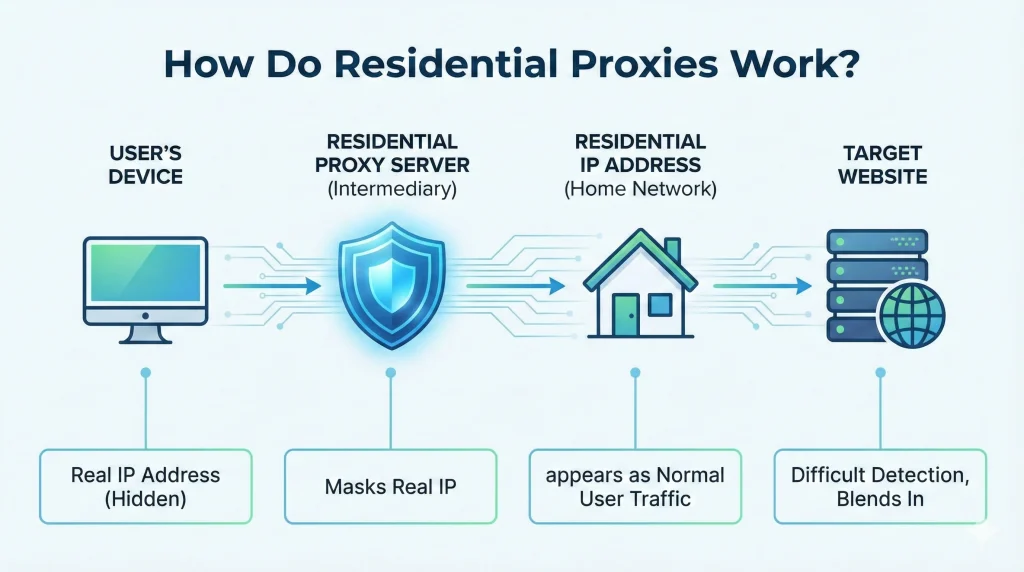
Residential proxies act as intermediaries between you and a target website. Instead of revealing your real IP, they provide a residential IP proxy that blends in with normal traffic, making detection more difficult than with datacenter proxies.
Residential Proxies Mistake #1: Not Rotating IPs Properly
One of the most common residential proxies mistakes is failing to rotate IP addresses.
Why This Is a Problem
Websites enforce rate limits. Reusing the same residential IP too often makes detection easy.
How to Fix It
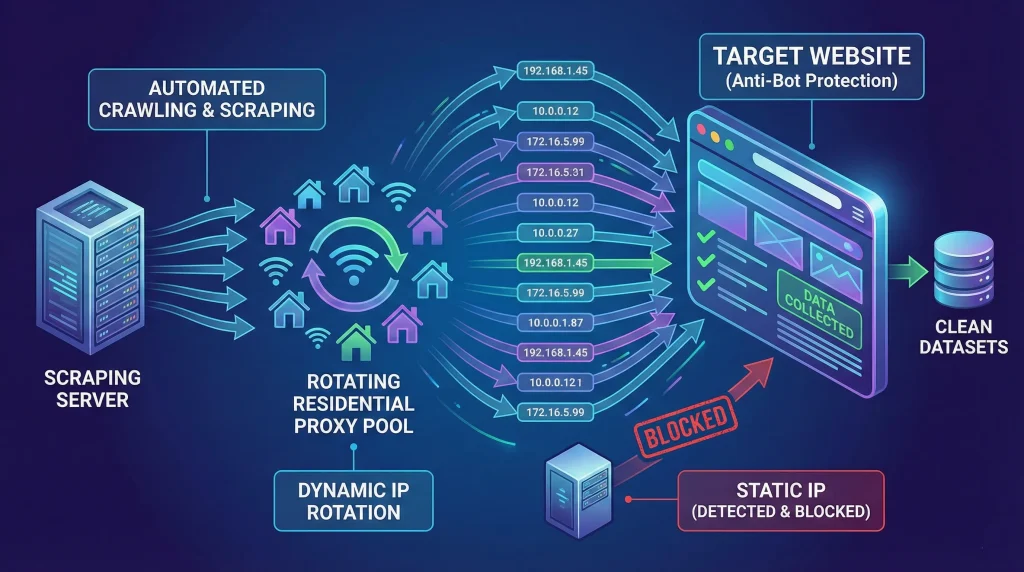
- Use rotating residential proxies for scraping and crawling
- Rotate IPs per request or per session
- Match rotation frequency to task complexity
OKKProxy offers dynamic residential proxies with automatic rotation to prevent IP overuse.
Residential Proxies Mistake #2: Using Free or Low-Quality Providers
Many users search for how to get free residential proxies. This is risky.
Risks of Free Residential Proxies
- Data interception
- Shared, abused IPs
- Poor uptime and performance
According to Google’s guidance on automated traffic and site policies, low-quality proxy traffic is easily flagged: https://developers.google.com/search/docs/crawling-indexing/robots/intro
Best Practice
Choose a reputable residential proxy provider with transparent IP sourcing and monitoring.
Residential Proxies Mistake #3: Using the Wrong Proxy Type
Not all residential proxies are the same.
Static vs Rotating Residential Proxy
| Proxy Type | Best Use Case |
| Static residential proxy | Account logins, session stability |
| Rotating residential proxies | Web scraping, large-scale crawling |
Using the wrong type leads to bans or wasted bandwidth.
Residential Proxies Mistake #4: Over-Aggressive Scraping Behavior
Residential proxies do not excuse bad scraping practices.
Common Errors
- Ignoring robots.txt
- Sending too many requests
- No delays between actions
To learn how rotation helps reduce bans, see our internal guide: Why Your Scraping Scripts Keep Getting Blocked
Residential Proxies Mistake #5: Incorrect Setup and Configuration
Many users struggle with:
- how to set up residential proxy
- how to use a residential proxy
Typical Setup Errors
- Wrong protocol (HTTP vs SOCKS5)
- Incorrect authentication
- Invalid ports
OKKProxy provides SOCKS5 residential proxies with clear setup documentation to reduce configuration issues.
Residential Proxies Mistake #6: Treating Proxies as “Set and Forget”
Residential proxies require monitoring.
What You Should Track
- Success rate
- Block frequency
- Data accuracy
Failing to monitor performance leads to bad data and wasted proxy usage.
Residential Proxies Mistake #7: Using Residential Proxies When You Don’t Need Them
Residential proxies are not always the best tool.
When They Are Overkill
- High-speed downloads
- Non-sensitive automation
A hybrid approach—datacenter proxies for speed and residential proxies for stealth—often works best.
How to Avoid Residential Proxies Mistakes (Quick Checklist)
- Rotate IPs intelligently
- Choose a trusted provider
- Match proxy type to task
- Respect target website rules
- Monitor performance continuously
FAQ: Residential Proxies Explained
Are residential proxies legal?
Yes, when ethically sourced and used in compliance with laws and website terms.
Are residential proxies more reliable than datacenter proxies?
For stealth and detection avoidance, yes.
Who is the best residential proxy provider?
The best provider offers clean IPs, transparent sourcing, rotation control, and real support—not just marketing claims.
Final Thoughts: Use Residential Proxies the Right Way
Most failures with residential proxies are not caused by the technology itself, but by avoidable residential proxies mistakes. When you understand how residential proxies work, rotate them correctly, configure them properly, and choose a reliable provider, they become one of the most effective tools for modern online operations.
If you want a residential proxy service designed for real-world use—not shortcuts—OKKProxy provides high-quality residential proxies, flexible rotation.
For more information, please watch our video about: Residential Proxies Gone Wrong: Top Errors & How to Fix Them
Explore OKKProxy residential proxy solutions and start using residential proxies the right way.